
Your store is making sales while you sleep. Sounds like a dream, right?
Here’s the reality: most online store owners are still manually sending emails, segmenting customers by hand, and wondering why they can’t scale past six figures. Meanwhile, their competitors are using ecommerce marketing automation to do all of this automatically and they’re crushing it.
We’ve worked with hundreds of online stores over the past decade, and the pattern is always the same. Brands that implement marketing automation tools see an average revenue increase of 30-47% within six months. Not because automation is magic, but because it lets you do what actually matters: deliver the right message to the right person at exactly the right time.
Without lifting a finger.
In this guide, we’re breaking down everything you need to know about ecommerce marketing automation, from the fundamentals to advanced strategies that DTC brands use to generate millions. No fluff. Just the tactics that actually move the needle.
Let’s get into it.
What is Ecommerce Marketing Automation?
Think of marketing automation as your store’s 24/7 marketing team that never sleeps, never takes breaks, and never forgets to follow up with a customer.
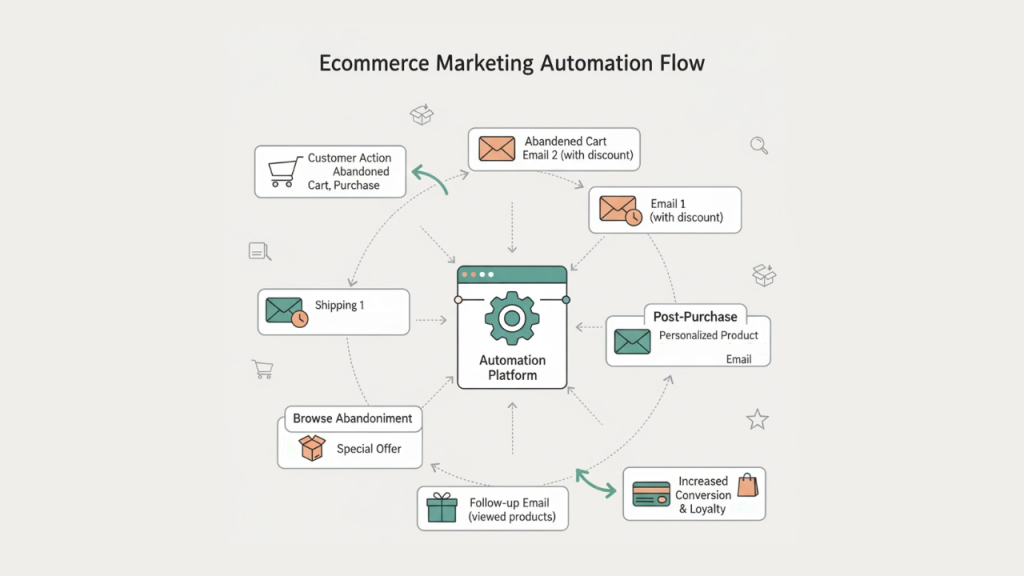
At its core, ecommerce marketing automation uses software to automatically execute marketing tasks based on triggers and customer behavior. When someone abandons their cart? Your system sends a recovery email. When a customer makes their third purchase? They automatically get added to your VIP segment and receive exclusive offers.
The beauty of automated marketing campaigns is that they run on autopilot once you set them up. You define the rules, create the content, and the system handles the rest.
How It Actually Works
Marketing automation platforms connect to your store and track customer actions, browsing behavior, purchases, email opens, cart additions, you name it. When a customer hits a trigger (like abandoning a cart or making a purchase), the system automatically responds with pre-built workflows.
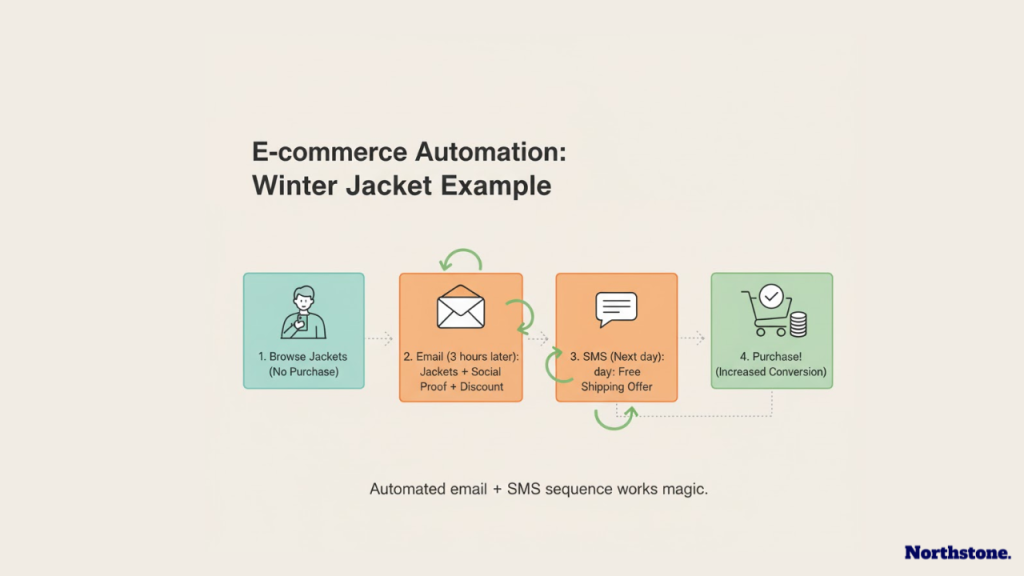
Here’s a simple example: A visitor browses your winter jacket collection but doesn’t buy. Three hours later, they receive an email showcasing those exact jackets with social proof and a small discount. The next day, if they still haven’t purchased, they get a text message with free shipping. That’s email marketing automation working with SMS automation all without you touching a thing.
Why Ecommerce Stores Are Going All-In on Automation
Let’s be honest. You can’t manually personalize messages for 10,000 customers. You just can’t.
But automation can.
The Numbers Don’t Lie
From what we’ve seen working with stores across different niches:
- Abandoned cart automation alone recovers 10-15% of lost sales (that’s potentially $15,000 monthly for a store doing $100K in revenue)
- Welcome series generate 320% more revenue per email than one-off campaigns
- Post-purchase automation increases customer lifetime value by 25-40%
- Segmented, automated campaigns get 14x higher click-through rates than generic blasts
One Shopify store we partnered with was sending manual email campaigns twice a week. Their open rates hovered around 18%. After implementing customer journey automation with proper segmentation, their automated emails averaged 41% open rates and generated 3x more revenue per send.
That’s the difference.
Beyond Just Saving Time
Sure, automation saves you hours every week. But here’s what really matters:
Consistency. Your automated workflows never forget to send that follow-up email. They don’t skip customers because you’re busy or on vacation.
Personalization at scale. You can create hundreds of customer segments and deliver tailored messages to each one based on their behavior, purchase history, and preferences.
Better timing. Automated campaigns send at optimal times for each customer. Someone who always opens emails at 9 PM? That’s when they’ll get yours.
Higher conversion rates. Behavioral triggers mean you’re reaching people when they’re actually interested, not when you randomly decide to send a campaign.
Essential Marketing Automation Tools for Online Stores
Here’s the thing about ecommerce automation software: there’s no “best” tool for everyone. What works for a $50K/month Shopify store selling supplements won’t necessarily work for a $2M/month fashion brand on Magento.
But there are clear leaders in different categories.
Top Platforms We Recommend
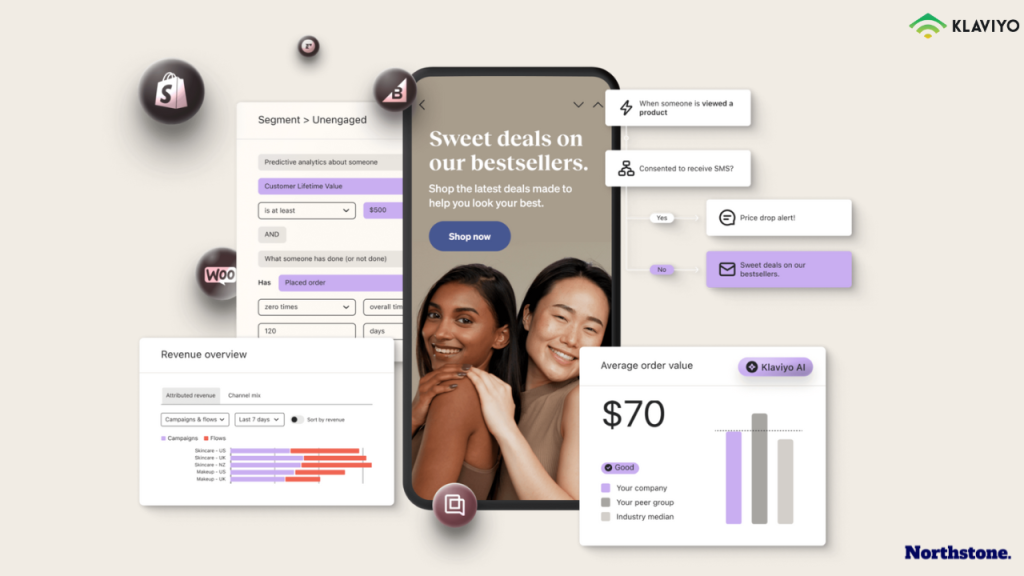
Klaviyo – The gold standard for ecommerce email marketing automation. Deep integration with Shopify, WooCommerce, and BigCommerce. Powerful segmentation and predictive analytics. Best for stores doing $20K+ monthly. (Yes, it’s pricey, but the ROI justifies it.)
Omnisend – Great middle-ground option. Combines email, SMS, and push notifications. More affordable than Klaviyo but still feature-rich. Perfect for stores scaling from $10K to $100K monthly.
ActiveCampaign – Excellent for stores that need CRM functionality alongside marketing automation. Strongest automation builder we’ve tested. Better for complex B2B or high-ticket ecommerce.
Drip – Built specifically for ecommerce. Fantastic visual workflow builder. Good sweet spot between price and features for growing stores.
Mailchimp – Still viable for beginners despite their pivot away from pure ecommerce focus. Free tier lets you test automation basics before investing.
Don’t Sleep on These Tools
Beyond email platforms, smart stores are using:
- Attentive or Postscript for SMS automation (text messages convert 10x higher than email for time-sensitive offers)
- Yotpo or Loox for automated review requests and UGC collection
- Gorgias for customer service automation (it integrates with your marketing automation platform)
- Zapier to connect everything together when native integrations don’t exist
The reality is you’ll probably use 3-5 tools working together. That’s normal. The key is making sure they all talk to each other properly.
Automated Marketing Campaigns Every Store Needs
Let’s talk about the workflows that actually make money. Not the fancy, complicated ones that look impressive but don’t convert. The bread-and-butter automations that pay for themselves immediately.
1. Abandoned Cart Recovery (The Obvious One That Still Works)
If you’re not recovering abandoned carts, you’re leaving 15-20% of your revenue on the table. Full stop.
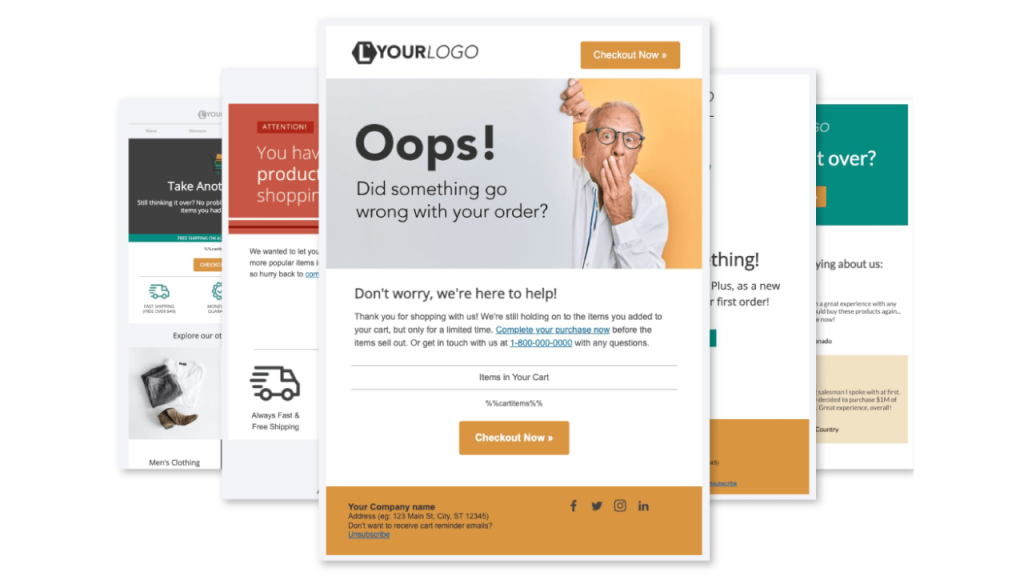
A solid abandoned cart automation looks like this:
- 1 hour later: Email reminding them what they left behind. Show the products, include reviews or testimonials.
- 24 hours later: Follow-up email with urgency (“Still interested? Stock is running low”) or a small discount if your margins allow it.
- 48-72 hours later: Final email with your best offer or free shipping.
Pro tip: Add SMS to your cart recovery flow for high-value carts ($100+). Text messages cut through the noise when emails get ignored.
2. Welcome Series (Your First Impression on Autopilot)
When someone subscribes to your list, what happens? If the answer is “they get added to my general list and receive whatever campaign I send next week,” you’re doing it wrong.
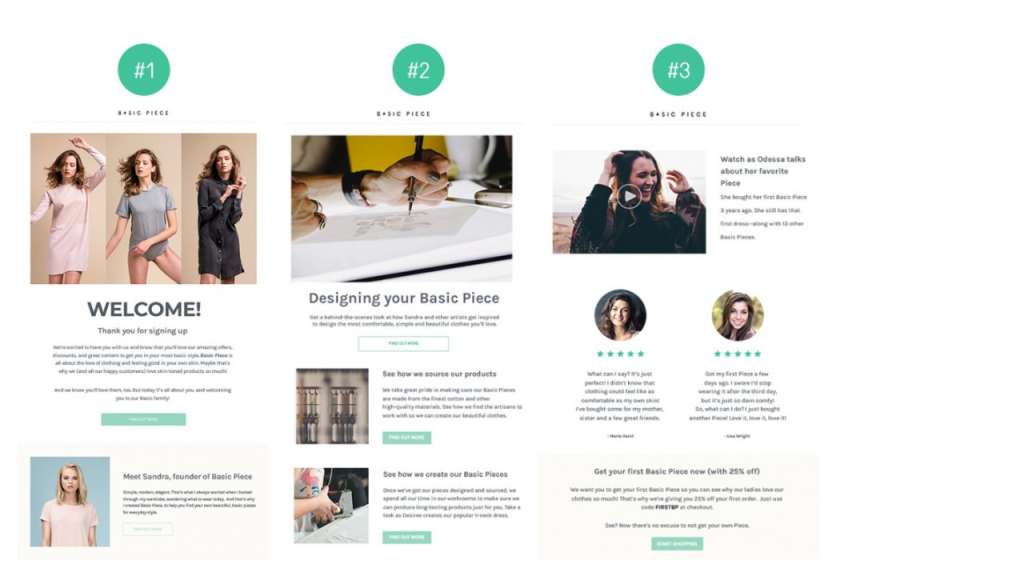
Your welcome series should:
- Send immediately after signup (within 5 minutes)
- Introduce your brand story and what makes you different
- Deliver whatever discount or freebie you promised
- Educate them on your best products or categories
- Include social proof and customer testimonials
Stretch this across 3-5 emails over 7-10 days. Don’t rush it. Welcome subscribers are your hottest leads treat them accordingly.
3. Post-Purchase Sequences (Where LTV Gets Built)
The sale isn’t the end of the customer journey. It’s the beginning.
After someone buys, immediately trigger:
- Order confirmation (obviously, but make it branded and include upsells)
- Shipping updates (keep them excited and reduce “where’s my order” tickets)
- Delivery confirmation with a thank you and review request
- 30-day check-in asking how they’re enjoying the product
- Replenishment reminder for consumables (45-60 days later depending on your product)
One supplement brand we work with generates 23% of their revenue from automated post-purchase flows. Twenty-three percent. That’s pure profit they were leaving on the table before.
4. Browse Abandonment (The Sneaky Revenue Driver)
Someone looks at a product but doesn’t add it to cart? Most stores ignore them. Smart stores don’t.
Send a browse abandonment email within 2-4 hours featuring the products they viewed plus similar items. Include customer reviews and any current promotions.
This converts at about 40% the rate of cart abandonment emails, but it catches people earlier in their decision process. It adds up.
5. Win-Back Campaigns (Bring Dead Customers Back to Life)
Define what “inactive” means for your business (typically 60-90 days since last purchase). Then automatically reach out to these customers with a compelling offer to come back.
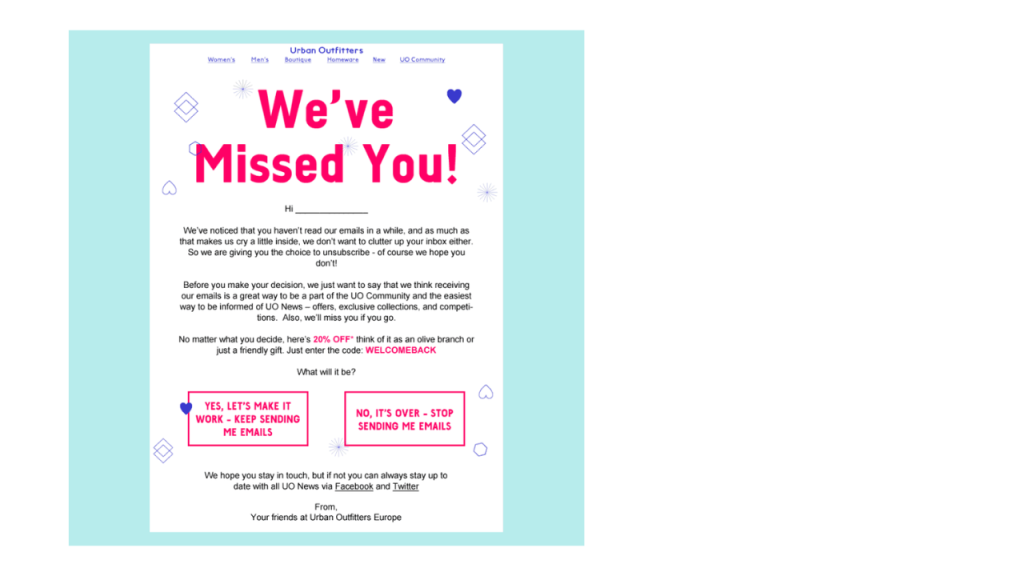
Test different approaches:
- “We miss you” with a discount
- New product announcements
- Customer testimonials showing what they’re missing
- Exclusive VIP offers
Win-back campaigns convert at 5-10% typically. Not amazing, but when you’re reaching thousands of lapsed customers automatically, it adds real revenue.
Customer Journey Automation: Beyond Basic Workflows
Here’s where things get interesting. Basic automations are table stakes now. Every decent store has abandoned cart emails and welcome series.
The stores crushing it in 2025? They’re using customer journey automation to create personalized experiences that feel handcrafted (but run on autopilot).
Segmentation Is Everything
You can’t send the same message to a first-time browser and a VIP customer who’s spent $2,000 with you. Well, you can, but your results will suck.
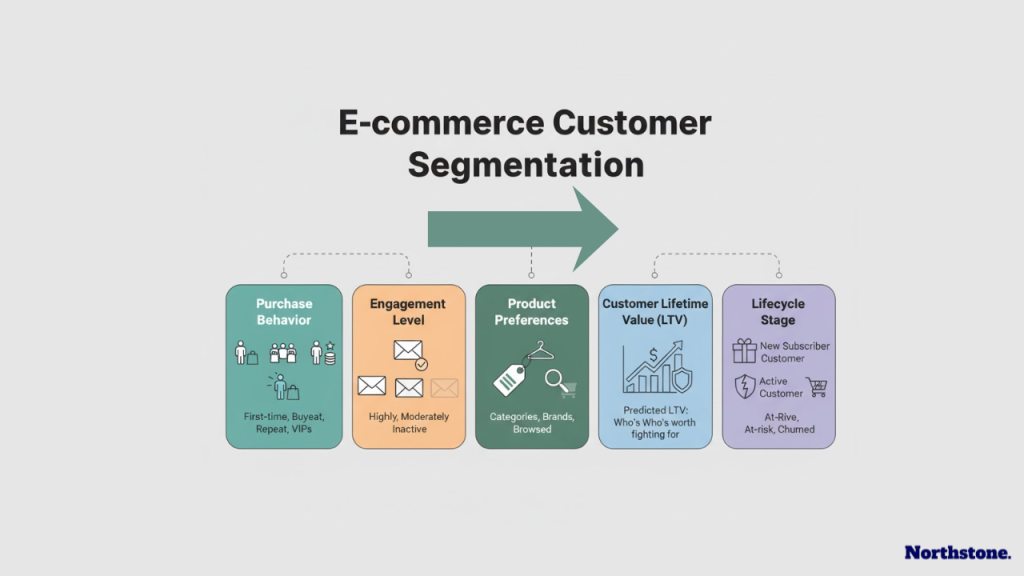
Build segments based on:
- Purchase behavior: First-time buyers, repeat customers, VIPs (top 20% of spenders)
- Engagement level: Highly engaged (opens every email), moderately engaged, inactive
- Product preferences: What categories or brands they’ve purchased or browsed
- Customer lifetime value: Predicted LTV helps you know who’s worth fighting for
- Lifecycle stage: New subscriber, active customer, at-risk, churned
The power move? Create dynamic segments that automatically update as customer behavior changes. Someone moves from first-time buyer to repeat customer? Their messaging automatically shifts to reflect that.
Predictive Sending (Let AI Do the Timing)
Most marketing automation tools now offer predictive sending using machine learning to determine the best time to send each individual customer an email based on their historical open patterns.
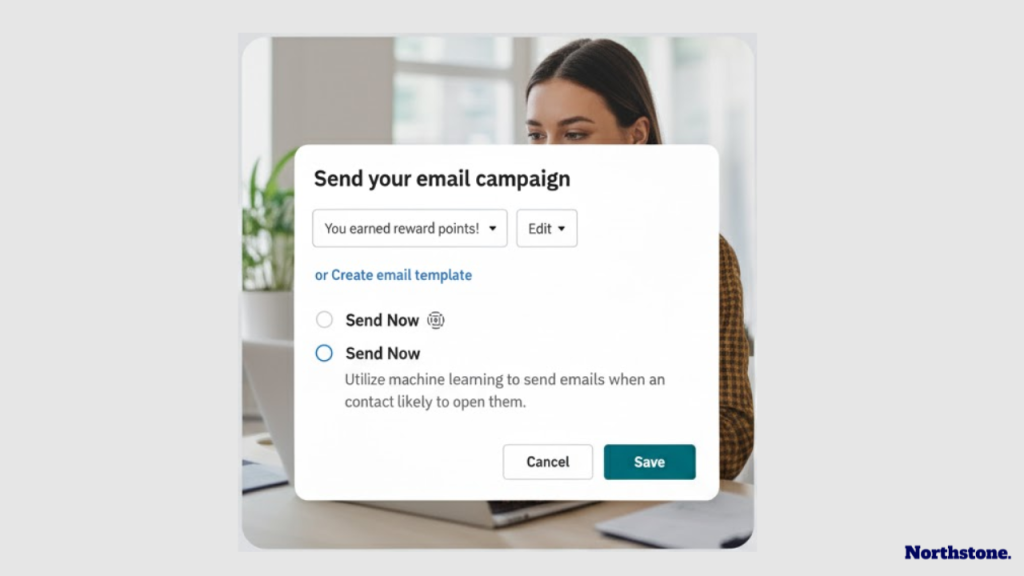
We’ve seen this increase open rates by 8-15% compared to batch-and-blast timing. Not revolutionary, but when you’re sending millions of emails annually, it compounds.
Cross-Channel Orchestration
Email alone isn’t enough anymore. The stores winning are coordinating messages across:
- SMS
- Push notifications (for stores with apps)
- Facebook Messenger (less common now, but still works for some audiences)
- On-site personalization (dynamic content based on customer segment)
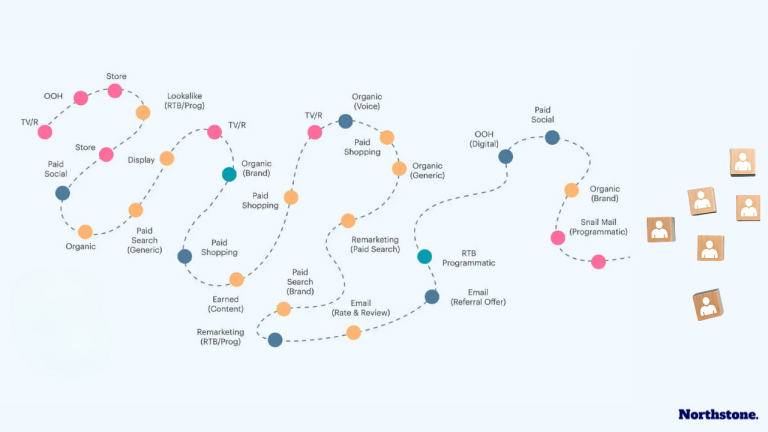
Example: A customer abandons their cart. First touch is an email after 1 hour. If they don’t open it within 6 hours, send an SMS. If they click the SMS but don’t complete purchase, show them a special offer when they return to your site.
That’s orchestration. That’s how you actually maximize recovery rates.
How to Set Up Ecommerce Marketing Automation (Without Losing Your Mind)
Let’s get tactical. You’re sold on automation, but where do you actually start?
Step 1: Pick Your Platform
Don’t overthink this. Start with one of the tools we mentioned earlier based on your budget and platform. Most offer free trials, test 2-3 before committing.
Key criteria:
- Native integration with your ecommerce platform (Shopify, WooCommerce, etc.)
- User-friendly workflow builder (you’ll be in here constantly)
- Robust segmentation capabilities
- Good deliverability reputation (ask for their average deliverability rates)
- Support quality (because you’ll need help)
Step 2: Implement Tracking Properly
This is where most stores screw up. They rush to build workflows before their tracking is solid.
Make sure you’re properly tracking:
- Site visitor behavior (product views, category browsing, time on site)
- Email engagement (opens, clicks, conversions)
- Purchase data (order value, products purchased, frequency)
- Customer attributes (name, location, birthday if you collect it)
Your marketing automation platform should have clear documentation on tracking setup. Follow it exactly. Bad data in means bad automation out.
Step 3: Start with the Big Three
Don’t try to build 15 automations in week one. Start with these three:
- Abandoned cart recovery
- Welcome series
- Post-purchase thank you and review request
Get these live, running, and optimized before moving to advanced stuff. These three alone will generate immediate ROI.
Step 4: Test, Measure, Iterate
Set benchmarks for each workflow:
- Open rates (aim for 35%+ on automated emails)
- Click-through rates (3-5% minimum)
- Conversion rates (varies by workflow, but track your baseline)
- Revenue per recipient
A/B test subject lines, sending times, offer types, and email copy. What works for other stores might not work for yours. Find your winning formulas through testing.
Step 5: Layer On Complexity Gradually
Once your core automations are humming, add:
- Browse abandonment
- Win-back campaigns
- Birthday/anniversary emails
- Replenishment reminders (for consumables)
- VIP/loyalty program automations
Then move into advanced segmentation and predictive features.
Common Mistakes That Kill Automation ROI
We’ve audited hundreds of stores’ automation setups. Here are the mistakes we see constantly:
Over-Automation
Yes, you can have too much of a good thing. Sending automated emails daily will destroy your deliverability and brand perception.
Generally, no customer should receive more than 2-3 automated emails per week (plus your regular campaigns). Set suppression rules to prevent email fatigue.
Ignoring Mobile Experience
Over 65% of ecommerce email opens happen on mobile. If your emails and landing pages aren’t mobile-optimized, you’re losing half your potential conversions. Non-negotiable in 2025.
Setting It and Forgetting It
Automation doesn’t mean “never look at it again.” Top-performing stores review their automation analytics monthly and optimize quarterly.
What was working six months ago might be stale now. Refresh copy, update offers, test new approaches.
Not Personalizing Enough
Using first names isn’t personalization anymore. That’s table stakes.
Real personalization means:
- Product recommendations based on browse/purchase history
- Dynamic content blocks that change based on customer segment
- Location-specific messaging
- Behavior-triggered content
The more relevant your messages feel, the better they perform. Always.
Poor List Hygiene
If you’re emailing people who haven’t opened in 180+ days, you’re hurting your deliverability for everyone else. Create suppression rules or sunset campaigns to clean your list automatically.
Better to have 10,000 engaged subscribers than 50,000 mostly-dead ones.
Advanced Strategies We’re Seeing Work in 2026
Want to level up beyond the basics? Here’s what the top 5% of stores are doing:
AI-Powered Product Recommendations
Tools like Klaviyo and Bloomreach now use AI to predict which products each customer is most likely to buy next based on purchase patterns, browsing behavior, and lookalike customer data.
We’re seeing 20-30% higher click-through rates on emails with AI recommendations versus static “featured products” sections.
Lifecycle Stage Automation
Instead of thinking in terms of individual campaigns, build entire journeys based on where customers are in their lifecycle:
- Awareness stage: Educational content, social proof, gentle product intros
- Consideration stage: Product comparisons, detailed features, reviews
- Purchase stage: Limited-time offers, urgency, risk reversal
- Retention stage: Usage tips, complementary products, loyalty rewards
- Advocacy stage: Referral programs, UGC requests, VIP perks
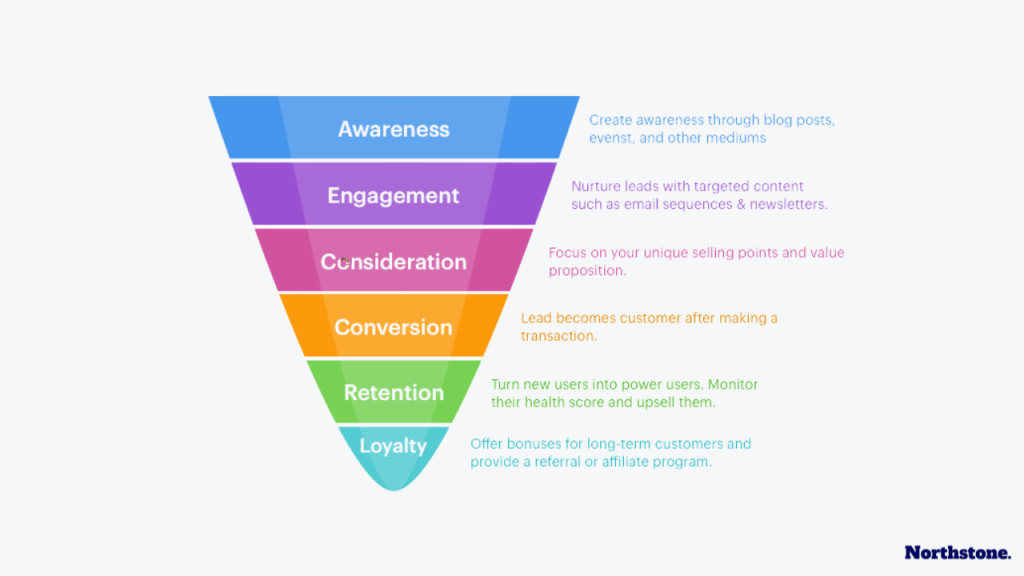
Each stage gets its own content strategy and automation flows.
SMS Integration Done Right
SMS isn’t just “email but shorter.” It’s a different channel with different rules.
Use SMS for:
- Time-sensitive offers (flash sales, cart recovery for high-value items)
- Shipping updates customers actually want
- Back-in-stock notifications
- Exclusive VIP offers
Don’t use SMS for:
- Daily promotions (you’ll get blocked fast)
- Long-form content
- Anything that could easily be an email
Keep it personal, keep it valuable, keep it infrequent.
Dynamic Content Blocks
Instead of creating 10 different email templates for different segments, create one template with dynamic content that changes based on the recipient.
Show different products, messaging, or offers based on:
- Gender
- Location
- Past purchases
- Price sensitivity
- Engagement level
This scales personalization without drowning in email variations.
Marketing Automation ROI: What to Actually Expect
Let’s talk numbers. What kind of return can you realistically expect?
The Baseline
For a typical ecommerce store implementing core automation workflows:
- 10-15% revenue increase within first 3 months
- 30-40% reduction in time spent on manual marketing tasks
- 25-35% improvement in email marketing revenue
- 40-50% increase in customer retention rate
These aren’t fantasy numbers. This is what happens when you move from manual campaigns to strategic automation.
Breakdown by Workflow
From our client data:
Abandoned cart automation: Recovers 10-15% of abandoned carts (typically $8-15 per email sent)
Welcome series: Generates 8-10x ROI compared to regular promotional campaigns
Post-purchase flows: Adds 15-25% to customer lifetime value
Browse abandonment: Converts at 2-4% (lower than cart but still profitable)
Win-back campaigns: Reactivates 5-10% of lapsed customers
The Timeline
- Week 1-2: Setup and implementation (minimal revenue impact)
- Month 1: Start seeing ROI from cart recovery and welcome series
- Month 2-3: Full automation suite running, clear positive ROI
- Month 4-6: Optimization kicks in, ROI increases 20-40%
- Month 6+: Mature automations running efficiently, consistent revenue contributor
The key is patience early on and consistent optimization ongoing.
Choosing the Right Ecommerce Automation Software for Your Store
Here’s how to actually decide (because we get this question constantly):
If You’re Just Starting (Under $10K/month revenue):
Go with Mailchimp or Omnisend. They have generous free tiers, are beginner-friendly, and will get you 80% of the results for minimal investment. You can always upgrade later.
If You’re Scaling ($10K-$100K/month):
Consider Klaviyo or Omnisend. At this stage, the ROI of better segmentation and automation capabilities justifies the higher cost. Klaviyo’s predictive analytics become valuable here.
If You’re Established ($100K+/month):
Klaviyo or ActiveCampaign depending on whether you need CRM functionality. At this revenue level, marginal improvements in automation performance translate to significant revenue. Pay for the best.
Platform-Specific Considerations
Shopify stores: Klaviyo or Omnisend have the deepest integrations.
WooCommerce stores: ActiveCampaign or Drip work great with WordPress ecosystem.
BigCommerce stores: Klaviyo or Listrak are your best bets.
Custom platforms: Prioritize tools with robust APIs and good developer documentation.
The Bottom Line
Ecommerce marketing automation isn’t optional anymore. It’s the difference between manually managing your marketing and scaling intelligently.
The stores winning in 2025 aren’t working harder, they’re automating smarter.
Start with the fundamentals: abandoned cart recovery, welcome series, and post-purchase flows. Get those running profitably. Then layer on complexity as you learn what resonates with your audience.
Remember: automation amplifies what you’re already doing. If your messaging sucks, automation will just deliver bad messages more efficiently. Get your core marketing foundation solid first, then automate it.
Ready to implement this in your store? Start with one automation this week. Just one. Set up a basic abandoned cart email sequence. See the results. Then build from there.
The compound effect of good automation is insane. Twelve months from now, you’ll wonder how you ever ran your store without it.
FAQ
What is ecommerce marketing automation?
Ecommerce marketing automation uses software to automatically execute marketing tasks based on customer behavior and triggers. Instead of manually sending emails or messages, you create workflows that run on autopilot, like abandoned cart emails, welcome series, or post-purchase follow-ups. It lets you deliver personalized messages at scale without constant manual work.
How much does marketing automation cost for online stores?
Costs vary widely based on your list size and features needed. Basic plans start at $0-50/month (Mailchimp, Omnisend free tiers) for stores just starting out. Mid-tier solutions run $100-300/month for growing stores. Enterprise platforms like Klaviyo can cost $500-2,000+/month for larger stores but typically deliver 20-30x ROI when implemented properly.
What’s the difference between email marketing and marketing automation?
Email marketing is manually sending campaigns to your list at specific times. Marketing automation triggers messages automatically based on customer behavior, someone abandons a cart, makes a purchase, or browses a product. Automation is “if this happens, then do that” logic that runs 24/7 without you. Email marketing is just one channel within a broader automation strategy.
How long does it take to see ROI from marketing automation?
Most stores see positive ROI within 30-60 days of implementing core workflows like abandoned cart recovery and welcome series. However, the real power compounds over time. After 6 months of optimization, stores typically see 30-40% increases in email marketing revenue and 25%+ improvements in customer retention rates.
Do I need technical skills to set up ecommerce automation?
Not really. Modern marketing automation platforms are designed for non-technical users with visual workflow builders and pre-built templates. If you can use basic software and follow step-by-step instructions, you can set up effective automations. Most platforms also offer setup support and extensive documentation. The biggest barrier isn’t technical skill—it’s strategic thinking about customer journeys.
This analysis is part of Northstone Insights‘ ongoing research into the evolving dynamics of e-commerce marketing and customer acquisition. Our reports combine data, strategy, and market intelligence to guide organizations toward higher ROI, conversion optimization, and brand authority. For tailored research, benchmarking, or strategic advisory support, contact the Northstone Insights team.

Leave a Comment